
Free Tools for WXYwaves Readers

Read the structure.
Trade with clarity.

Hand-picked MT5 indicators and dashboards built around the same philosophy as the recaps: structure over opinion, defined invalidation, no noise. Free for eligible broker clients.

Free for eligible clients

Impulse Radar™

28 charts, one screen. What’s strong, what’s weak, where trends are forming.

An MT5 dashboard that ranks the 8 major currencies by relative strength across multiple timeframes, surfaces the best trend pair opportunities, and tracks Gold, Indices and Crypto in one view — so you stop hunting setups and start seeing them.
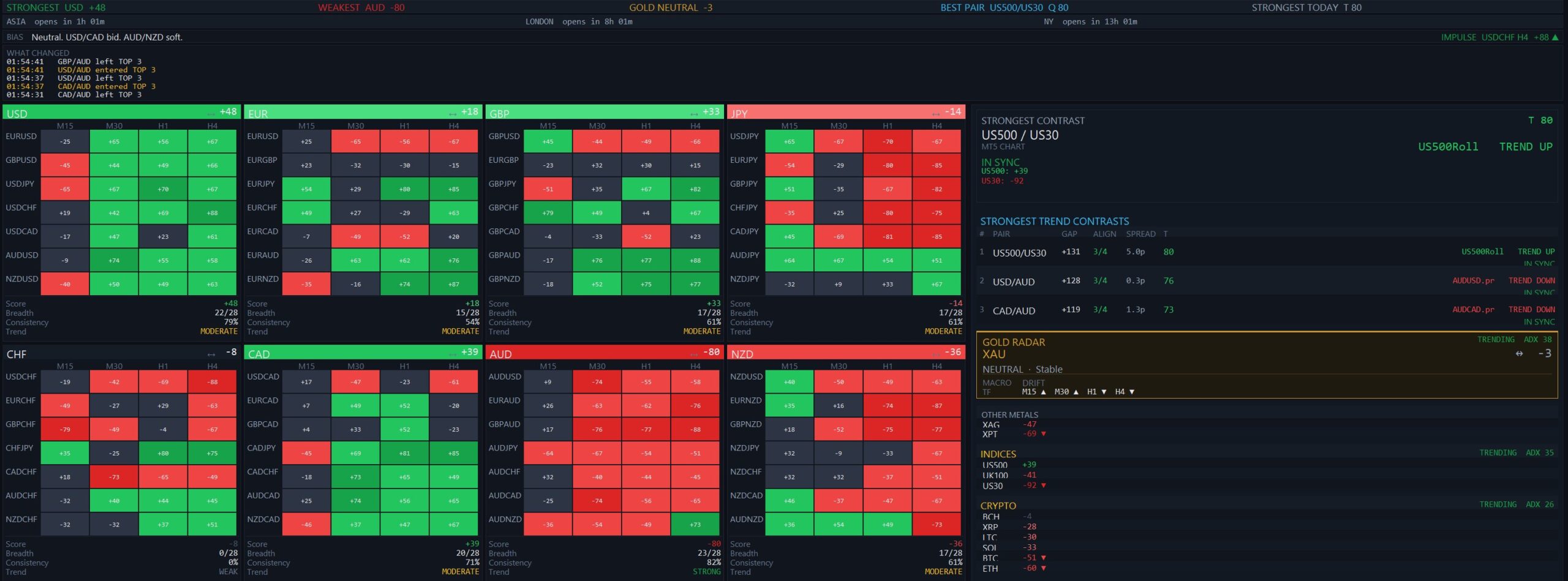
Impulse Radar dashboard showing 28 currency pair strength grid
  • Strongest vs. weakest currencies, live across M15 → H4
  • Top trend pair opportunities ranked by alignment score
  • Real broker symbols — click any cell to open the chart
  • Gold Radar, Indices, and Crypto all in the same screen
  • TREND UP / DOWN direction tags with confidence rating
  • What Changed log — see the last 5 events that moved the rankings

How to get free access

Open an account with my broker through the link below, then email me your client ID — I’ll send the indicator and install instructions, on the house.

Free for eligible clients

Round Levels

The price magnets the market keeps coming back to.

Round numbers (00s, 50s) act as institutional reference points and visible support/resistance for everyone watching the chart. This indicator draws them automatically on any instrument and any timeframe — so you stop measuring and start trading the structure.

  • Auto-draws round-number levels on any symbol and timeframe
  • Adjustable density — 100-pip levels, 50s, or 25s
  • Custom colours, line styles, and label visibility
  • Built for FX, indices, gold, and crypto out of the box
  • Lightweight — no chart lag, even on tick or M1
  • Pairs with Impulse Radar — round levels are the confluence zones the radar finds

Same deal — one account unlocks both

Already opened an account for Impulse Radar? Just email me your client ID and I’ll send Round Levels too — every tool on this page comes with the same account.

● Free with every Equiti account

See your stop-out line before the market gets there.

A MetaTrader 5 indicator I include free when you open an account through me — so you always know how far price can move before Margin Call and Stop Out.

MetaTrader 5 ● EURUSD ● M15
1.050001.030601.01510Margin call 1.03060Stop out 1.01510Stop-out monitor (account-wide)Equity 5,000.00 USDBalance 10,000.00 Free 1,950.00Margin 3,050.00 Lvl 163.9%SO 50% / MC 100%Buffer to SO: 3,475.00 USDEURUSD: LONG 1.00Stop Out @ 1.01510 (-349 pips)Margin Call @ 1.03060 (-194 pips)
🕁 MT5 Indicator ● Free

Stop-Out Level

Most traders watch price. Far fewer watch how close their account is to a stop out — until it’s too late. Stop-Out Level draws that danger zone directly on your chart, with a live panel showing equity, margin level and exactly how much further loss you can absorb — in your own account currency.

Platform MT5Type IndicatorPrice Free
Get it free with an Equiti account →

What it does

  • Live Stop Out & Margin Call price lines on your chart
  • Account panel: balance, equity, free margin, margin level % & buffer to stop out, in cash
  • Account-wide (multi-symbol) or current-symbol-only modes
  • Reads your broker’s stop-out settings automatically (percent or money)
  • Updates every second — reacts even when your other positions move
  • Display-only: never places trades, runs alongside your EA
  • Fully customizable colours, line styles and panel position

Works on MetaTrader 5. For risk-awareness and informational purposes only — trading involves risk; this tool helps you see your margin situation but does not prevent losses or guarantee any outcome.

How it works

Three steps. Five minutes. Zero cost if you’re already trading.

01

Open an Equiti account

Register through the link above. Standard, ECN or Premier — all eligible. Fund whenever you’re ready to trade.

02

Email me your client ID

Send your Equiti client ID and I’ll confirm eligibility, then email back the indicator file with install instructions.

03

Install on MT5

Drag the indicator into MT5, attach to any chart, and the dashboard launches. Same indicator I use to write the recaps.

Tools — frequently asked questions

How the indicators work and how to get them.

Open a trading account through my broker link, then message me your client ID — I’ll send the indicator and install instructions. See the broker page for details.
The indicators are built for MetaTrader 5. The Stop-Out Level indicator reads your broker’s stop-out and margin-call settings automatically, so it adapts to your account.
No. They are display-only — they draw levels and information on your chart and never place, modify or close trades. They run safely alongside any EA.
The tools are included when you open an account through my broker link. Trading itself carries risk — these tools help you see your situation but do not prevent losses or guarantee any outcome.

Disclaimer: Not Financial Advice

The content provided on WXYwaves is for educational and informational purposes only. It should not be construed as professional financial advice. Trading financial markets involves a high degree of risk and is not suitable for all investors. You could lose some or all of your initial investment.

Affiliate Disclosure
Some links on this page (including the Equiti broker link) are affiliate links. If you sign up through them, we may earn a commission at no extra cost to you. We only recommend tools we use ourselves and believe in.